


Use this command to get an IP address or a domain name from the Domain Name Server. If you enter a domain name, TN3270 Plus returns the IP address. If you enter an IP address, TN3270 Plus returns the domain name.
Step by Step Instructions for Using the DNS Lookup command
| 1. | Open the Internet menu; click on DNS Lookup. |
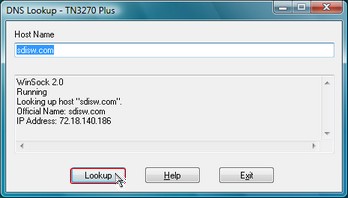
| 2. | Fill in the DNS Lookup dialog box. |
| Host name | Enter the host domain name or IP address of a remote computer. |
| 3. | Click the Lookup button. The host domain name and IP address are returned in the response list box. |
Tip:
You may continue to work in your TN3270 Plus sessions while the DNS Lookup command is processing.
See Also:
TN3270 Plus is continually being improved. To learn more about the latest enhancements, please review our Version History web page.